

Have you recently received an invoice that looks official for a domain name renewal or online service? It might come from a company you don’t recognise, like “IDS Ireland” (idsireland.com). Be warned – this is a sophisticated scam designed to trick busy business owners into paying for services that don’t exist.

At CK Computer Solutions, we’re seeing a rise in these fake invoices and want to ensure our clients and the wider business community are protected. Here’s what you need to know and what to do if you receive one.

Who Are the Scammers at idsireland.com?

The website idsireland.com presents itself as a legitimate business offering domain registration, SEO services, and online directory listings. However, this is a front. Their primary business model is sending out high volumes of convincing, yet entirely fraudulent, invoices.

They prey on the fact that many businesses handle dozens of invoices every month. Their goal is to slip their fake invoice past a busy accounts department and get paid before anyone realises it’s a scam.
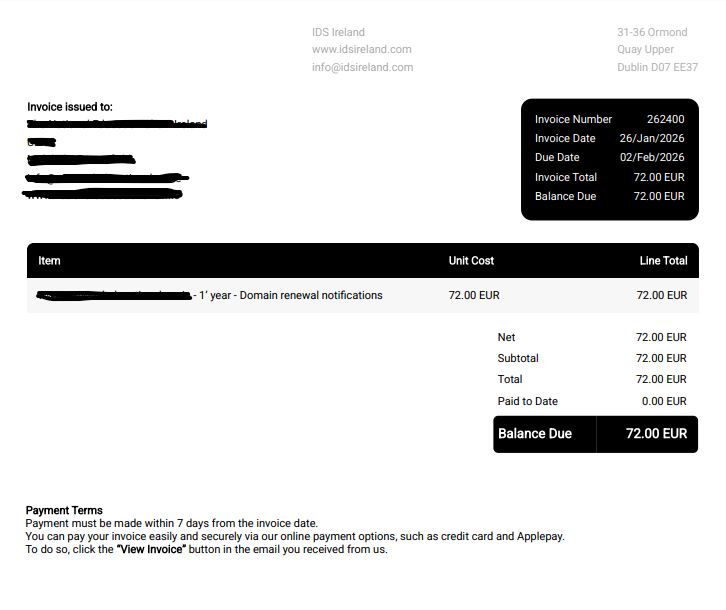
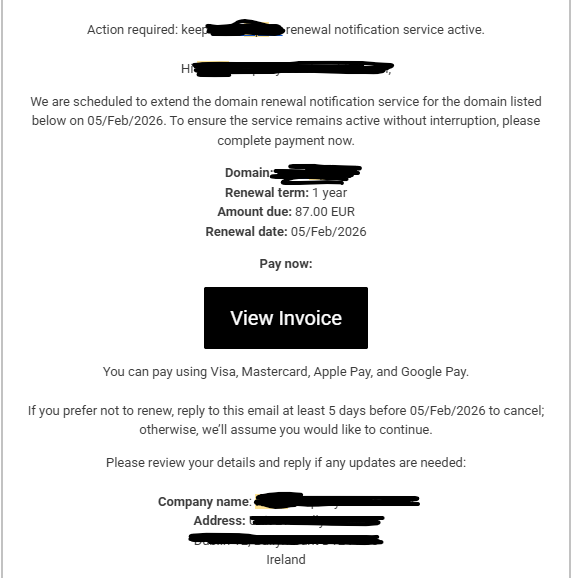
The Deceptive Art of the Fake PDF Invoice

What makes this scam particularly effective is how professional the invoice looks. This isn’t a poorly written email from a prince in a foreign land.

  • It’s a PDF: An attached PDF file immediately lends an air of legitimacy. It looks like a “real” document that you might print or file away.
  • Official Branding: The PDF will often have a logo, your business name, an invoice number, and a due date.
  • Plausible Amounts: The amounts they request are often small enough (e.g., €50, €95, €200) not to raise immediate red flags. A busy person might just see “domain renewal” and approve the payment without a second thought.

It’s incredibly easy to fall for it. The scammers are counting on you being too busy to double-check every single service provider.

Red Flags to Spot a Fake Invoice

Always be suspicious of an invoice if:

  • The sender is unfamiliar: Have you ever done business with “IDS Ireland” or the company named on the invoice?
  • The service description is vague: It might say “Domain Renewal” or “SEO Service” but won’t specify the exact domain name or website it’s for.
  • There’s a sense of urgency: The invoice may threaten that your service will be “suspended” or “cancelled” if you don’t pay immediately.
  • The payment details are strange: They may ask for a bank transfer to an unusual account or use a payment processor you don’t recognise.

What to Do If You Receive a Suspicious Invoice: A Step-by-Step Guide

Receiving one of these can be unsettling, but the correct response is simple and crucial.

STEP 1: DO NOT PAY! This is the most important rule. Do not click any payment links, do not make a bank transfer, and do not provide any credit card details. Paying the invoice will not only lose you money but also confirm to the scammers that your email address is active, likely leading to more scam attempts.

STEP 2: DO NOT CLICK OR ENGAGE Do not click any links in the email or the PDF. Do not reply to the email. Do not click “Unsubscribe”. Clicking links can lead to malicious websites, and replying confirms your email address is active.

STEP 3: INDEPENDENTLY VERIFY THE INVOICE This is where you can fight back. If you are even slightly unsure about an invoice for a domain, hosting, or any IT service, your first port of call should be your trusted IT provider.

Contact CK Computer Solutions immediately to verify if the email is genuine or not.

When you contact us, we can quickly check our records and confirm whether we have issued the invoice or if the service is legitimate. We will always give you a clear, honest answer.

IMPORTANT: Do not use any contact information, phone numbers, or websites listed on the suspicious invoice. Find our contact details through a trusted source, like our official website or a previous email you know is genuine.

STEP 4: DELETE AND REPORT Once CK Computer Solutions (or your trusted provider) has confirmed the invoice is a fake, delete the email and mark it as “Phishing” or “Spam” in your email client. This helps your email provider filter out future attempts.


Stay Vigilant and Stay Protected

Scammers like those behind idsireland.com are always looking for new ways to deceive honest businesses. The best defence is a healthy dose of skepticism and a simple verification process.

Remember the golden rule: When in doubt, check it out.

Never make a payment for a service you can’t 100% verify. If you have any concerns about an invoice you’ve received, please do not hesitate to get in touch with CK Computer Solutions. We are here to help keep your business safe and secure.

Share this post with your colleagues and business associates to help spread the word and stop these scammers in their tracks.


Running a business today means relying heavily on Microsoft technologies. Email, collaboration, security, cloud hosting, identity management — they all sit right at the heart of daily operations. When everything works, nobody notices. When it doesn’t, productivity drops, customers feel it, and stress levels rise fast.

This is where a Managed Service Provider (MSP) comes in. Instead of reacting to problems as they happen, an MSP takes ownership of your Microsoft environment and manages it properly, day in, day out.

Below, we’ll break down why using an MSP for your Microsoft platform support is not just a nice-to-have, but a smart business decision.

The Microsoft Platform Is Powerful — and Complex

Microsoft’s ecosystem has grown massively over the last decade. Most businesses now rely on some combination of:

  • Microsoft 365 for email, Teams, SharePoint and OneDrive
  • Cloud infrastructure and virtual servers
  • Identity and access management
  • Endpoint security and device management
  • Backup, compliance and data retention

Each of these systems works brilliantly when configured correctly. The challenge is that Microsoft platforms are not “set and forget”.

Settings change. Security threats evolve. Licencing rules shift. New features are rolled out constantly. What worked well last year may now expose your business to risk.

An MSP lives inside this ecosystem every day. They understand how the moving parts fit together and, just as importantly, how small configuration mistakes can lead to big problems later.

Proactive Support Instead of Firefighting

One of the biggest differences between break-fix IT support and an MSP is the mindset.

Break-fix support waits for something to go wrong. An MSP works to stop issues before they happen.

With Microsoft platforms, this proactive approach makes a massive difference. An MSP will:

  • Monitor systems for early warning signs
  • Apply updates and patches safely
  • Review security settings regularly
  • Spot misconfigurations before users are affected

Instead of reacting to outages, you get stability. Instead of urgent calls, you get planned improvements.

That shift alone can save businesses a serious amount of time, money, and frustration.

Stronger Security Across the Board

Cyber security is no longer optional. Microsoft provides excellent security tools, but they are only effective when configured and managed properly.

An MSP understands how to layer Microsoft’s security features together, including:

  • Multi-factor authentication (MFA)
  • Conditional access policies
  • Email threat protection
  • Device compliance rules
  • Secure user onboarding and offboarding

Many businesses think they are secure because they “use Microsoft”. In reality, default settings are rarely enough.

An MSP ensures your Microsoft platform is locked down appropriately for your business, without making life harder for staff.

Security becomes part of daily operations, not an afterthought.

Better Use of Microsoft Licences

Microsoft licencing is famously confusing. It’s easy to overpay for features you don’t use or miss out on tools you already own.

An MSP helps by:

  • Reviewing your current licencing
  • Matching licences to actual user needs
  • Removing unused or unnecessary subscriptions
  • Advising when upgrades genuinely make sense

Over time, this often results in lower costs and better value from the Microsoft tools you’re already paying for.

Instead of guessing, you get clear advice backed by experience.


Faster Support When Things Go Wrong

Even with the best planning, issues can still happen. When they do, speed matters.

An MSP already understands your environment. They know how your Microsoft tenant is structured, how your users work, and what changes have been made over time.

That means:

  • Faster fault diagnosis
  • Quicker fixes
  • Less disruption for staff
  • Clear communication during incidents

You’re not explaining your setup from scratch every time. Support becomes efficient and predictable.

Scalability as Your Business Grows

Growth is a good problem to have, but it brings IT challenges with it.

New users, new devices, new locations, and new compliance requirements all add pressure to your Microsoft environment.

An MSP designs systems with growth in mind. Adding users, deploying devices, or rolling out new Microsoft features becomes straightforward rather than chaotic.

This is especially valuable for businesses that are expanding, hiring regularly, or adopting hybrid and remote working models.

Clear Advice, Not Just Technical Fixes

A good MSP doesn’t just fix problems. They act as a trusted advisor.

Because they work with Microsoft platforms across many businesses, they can:

  • Recommend best practices
  • Warn about upcoming changes
  • Suggest smarter ways to work
  • Help align IT decisions with business goals

Instead of reacting to technology trends, you can plan for them.

That strategic input is often just as valuable as the technical support itself.

Reduced Internal IT Burden

Many small and medium-sized businesses rely on one person “who knows a bit about IT”. Over time, that becomes unsustainable.

Microsoft platforms require ongoing attention. Expecting internal staff to manage security, updates, troubleshooting, and optimisation alongside their day job is risky.

An MSP removes that pressure. Your team can focus on what they do best, while specialists handle the Microsoft environment properly.

Consistency and Documentation

One often overlooked benefit of an MSP is consistency.

Configurations are documented. Changes are tracked. Best practices are followed every time, not just when someone remembers.

This makes a huge difference when:

  • Staff leave or join
  • Audits are required
  • Systems need to be restored
  • Security incidents occur

Your Microsoft platform becomes a well-managed system, not a collection of ad-hoc settings.

How CK Computer Solutions Can Help

At CK Computer Solutions – Managed IT Services Dublin, we specialise in supporting businesses that rely on Microsoft platforms every day.

We don’t just “support Microsoft”. We design, integrate, secure, and manage it as a complete system that supports how your business actually works.

Our MSP services include:

  • Full Microsoft 365 management and support
  • Secure setup of email, Teams, SharePoint and OneDrive
  • Identity, access, and security configuration
  • Ongoing monitoring, updates, and optimisation
  • Clear advice tailored to your business, not generic templates

Whether you’re already using Microsoft extensively or planning a migration, we help you get more value, better security, and fewer headaches from the platform.

If you want Microsoft to work quietly in the background — supporting your team instead of slowing them down — an MSP approach makes all the difference.


CK Computer Solutions is proud to announce an open position for IT Support, Helpdesk/Deskside Engineers.
If you’re a motivated, have experience in IT Services and want to join an expanding IT Services company, send your CV to jobs@cksolutions.ie or[intlink id=”245″ type=”page”]click here[/intlink] for more.


Contact Us